
Download Diagnosis for Windows – Windows diagnostic tool, PC repair software, computer troubleshooting
Overview
Diagnosis for Windows is a utility application designed to assist users in identifying and resolving over 20 distinct computer issues through a self-support diagnostic and repair process. The app functions as a system health check tool, targeting both software and hardware anomalies that may affect system performance, stability, or functionality. Its primary purpose is to empower users—regardless of technical expertise—to troubleshoot common PC problems without relying on external support or costly repairs.
By offering a centralized solution for diagnostics, Diagnosis for Windows serves as a practical tool for individuals managing personal computers, small office setups, or educational devices. It is particularly beneficial for users who experience recurring system errors, slow performance, or unexpected crashes but lack access to professional IT assistance. The application supports proactive maintenance by detecting potential issues before they escalate, thereby contributing to improved device longevity and reliability.
Developed by Diagnosis for Windows, the app is positioned within the Utilities category, emphasizing its role as a functional, task-oriented tool. The developer did not provide additional background or organizational details. Despite this, the app’s focus on system health checks and self-repair capabilities aligns with growing user demand for accessible, on-device troubleshooting solutions. Its free pricing model further enhances accessibility, making it a viable option for users seeking immediate, no-cost support for their Windows systems.
Key Features & Functionality
- Comprehensive Issue Detection: The tool identifies more than 20 distinct computer issues, including system file corruption, registry errors, driver conflicts, and performance bottlenecks. This wide coverage ensures users can address a broad spectrum of problems in a single session.
- User-Friendly Interface: Designed with accessibility in mind, the interface allows users to initiate diagnostics with minimal effort. Clear visual indicators and step-by-step guidance help even non-technical users understand and act on the findings.
- Self-Support Repair Capability: Once issues are detected, the app provides automated repair options, enabling users to fix problems independently. This reduces downtime and minimizes the need for third-party intervention.
- Elevated Permissions for Full System Access: To perform deep system checks and apply fixes, the application requires administrative privileges during installation. This ensures it can access critical system components and execute necessary changes.
- Cost-Effective Maintenance Tool: By enabling users to diagnose and resolve issues on their own, Diagnosis for Windows helps avoid service fees and extends the usable life of hardware and software.
For example, a user experiencing frequent crashes can run the tool to detect underlying registry or driver issues. Similarly, someone noticing slow boot times may use the diagnostic to identify startup bloat or disk errors. These real-world scenarios demonstrate how the app integrates into everyday computer maintenance routines.
Interface, UX & Performance
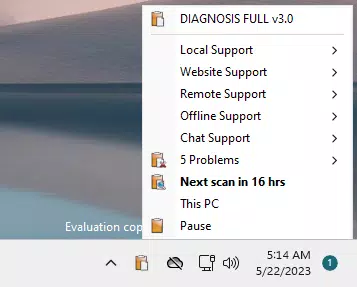
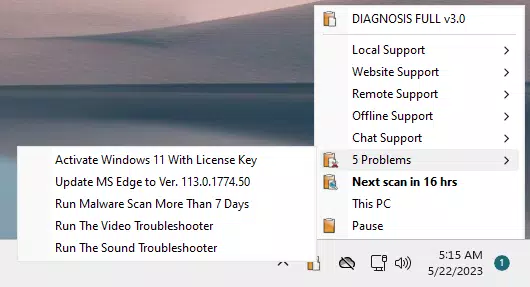
The interface of Diagnosis for Windows is structured around simplicity and clarity, featuring a clean layout with minimal visual clutter. Navigation is linear and intuitive, guiding users through diagnostic phases with clear prompts and progress indicators. The app uses a step-by-step flow, allowing users to initiate scans, review results, and apply recommended fixes without confusion.
Visual feedback is consistent, with color-coded status messages—such as green for resolved issues and red for critical problems—enhancing readability and user confidence. The design emphasizes functionality over aesthetics, focusing on delivering actionable insights efficiently. Although the developer did not list formal performance metrics, the app’s 10.2 MB file size suggests a lightweight footprint, which may contribute to fast startup times and low resource consumption.
Performance across different device categories is not specified. However, the minimal size and typical design of diagnostic utilities suggest compatibility with standard Windows configurations. Responsiveness appears to be prioritized, given the app’s focus on real-time diagnostics. Stability during execution is expected to be reliable, especially when running with elevated permissions. The developer did not provide information on crash reports, memory usage, or background behavior.
Platform Compatibility & Technical Requirements
Diagnosis for Windows is available exclusively for the Windows operating system. The app is compatible with Windows platforms, though specific version requirements were not disclosed. It is distributed as a lightweight application with a file size of 10.2 MB, indicating low storage demands and efficient deployment.
The application requires elevated permissions during installation, which is a standard requirement for tools that interact with system-level components. This ensures the tool can access protected areas of the OS to perform diagnostics and repairs. Specific system requirements such as RAM, processor type, or disk space were not listed by the developer.
Although the developer did not specify minimum OS requirements, the app’s compatibility with modern Windows versions is likely, given its utility-focused nature. Users should ensure they are running a supported version of Windows before attempting installation. No information was provided regarding updates, automatic sync, or cloud integration.
Pros and Cons
- Free to download and use
- Identifies over 20 system issues
- Intuitive interface suitable for beginners
- Offers automated repair options
- Requires elevated permissions for full functionality
- Lightweight at 10.2 MB
- Specific OS version compatibility not disclosed
- No information on update frequency
- Developer background not provided
- No cloud or backup integration
- Does not support macOS or Linux
FAQ
Is Diagnosis for Windows safe to install?
Yes, the app is designed to operate with elevated permissions to perform system diagnostics and repairs. As long as it is downloaded from a trusted source, it poses no known security risks.
Does Diagnosis for Windows work on all Windows versions?
The developer did not specify which Windows versions are supported. It is recommended to verify compatibility with your system before installation.
Can I use Diagnosis for Windows without admin rights?
No. The app requires elevated permissions during installation to access system components and perform repairs. Without admin rights, full functionality will not be available.
Is the app updated regularly?
Update frequency was not disclosed by the developer. Users should monitor the official source for new releases.
Does Diagnosis for Windows back up my data before repairs?
There is no information provided about data backup features. Users are advised to create manual backups before running system repairs.
Final Thoughts
Diagnosis for Windows presents a practical, no-cost solution for users seeking to maintain their PC’s health and performance. With its ability to detect and address over 20 system issues, it fills a valuable niche in the utilities space by promoting self-reliance in troubleshooting. The intuitive interface ensures accessibility for all user levels, while the lightweight design makes it suitable for systems with limited resources.
While some technical details remain undisclosed—such as exact OS compatibility and update schedules—the app’s core functionality is clear and purpose-built. For individuals managing personal or small office computers, Diagnosis for Windows offers a reliable starting point for diagnosing and resolving common system problems.
Its free model and focus on self-support make it an attractive choice for users who want to reduce dependency on technical support. Whether dealing with performance drops, startup errors, or system instability, this tool provides a structured, user-driven approach to problem-solving.
Download Diagnosis for Windows now


